ADR-0029: An Azure module with dedicated services, environment and cluster layers, restricted by default and private on request
- Status: Proposed
- Date: 2026-11-10
Context
Epic #545 lets someone install Shadewright on an existing AKS cluster with a published Terraform module and a reference architecture. Task #546 records the decisions the epic made on 2026-11-08, after an assessment, /breakdown and /challenge premortem. This ADR writes them down with the alternatives. Beyond the epic it decides the deployer permissions per layer and the landing-zone check (section 5), the grants and the admin principal (section 6), the tag precedence (section 7), and how the module treats the analyzer's blob grant, the identities' lifetime, the audit workspace endpoint and the single GitHub App key (see Alternatives).
What runs on Azure today is the lab in the shadewright-azure repository, written for one subscription of the maintainer:
foundation/is the part that outlives a lab: a Foundry account with model deployments (foundry.tf), a Key Vault holding the GitHub App key (keyvault.tf), a storage account for analysis records (analysis-store.tf), a Log Analytics workspace for the Key Vault audit log (keyvault.tf), and one managed identity per component (identities.tf, ADR-0008).lab/is the part that is applied for a session and destroyed: the AKS cluster (aks.tf) and the federated credentials that bind the identities to the cluster's ServiceAccounts (federation.tf). Flux is installed byscripts/lab.shafter the apply.- Roles are narrow: the analyzer may only write blobs in one container and call the models, the executor may only sign with the one key (ADR-0006, invariant 6). Both custom roles are defined at subscription or resource group scope (
analysis-store.tf,keyvault.tf). The analyzer's blob role is not create-only today (section 6). - Services are reachable over public endpoints restricted by an IP allowlist and the cluster's subnet, with fixed names built from a prefix.
That is right for a lab and wrong for anyone else: another subscription, a locked-down network, a platform team that owns role definitions and DNS, several clusters. The decisions below make the same grants reproducible in a module others can read and test.
Decision
1. What the module is
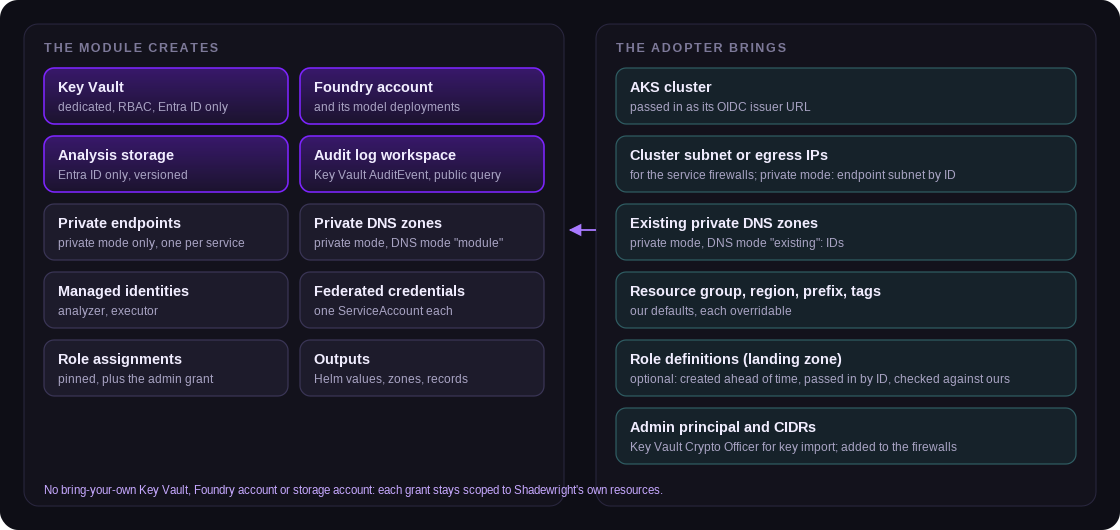
The module adds what Shadewright needs on Azure to an existing cluster. It never creates the cluster, the virtual network, hubs, firewalls or any other part of the adopter's network. Out of scope: other clouds, AKS itself.
It lives in its own repository, terraform-azurerm-shadewright (logo, rulesets, CI, release-please), and is published to the Terraform Registry. The lab in shadewright-azure uses it, so the lab is the first adopter and the module is tested by the way it is used. Code and the repository are the work of the epic's other tasks; this ADR fixes the shape.
2. Dedicated services, always created by the module
The module always creates its own Key Vault, Foundry account with the model deployments, analysis-record storage account and audit log workspace. It does not accept existing ones. The reason is invariant 6 and need to know: every role assignment is scoped to a resource that holds only Shadewright's data, so "the executor may sign with this one key" and "the analyzer may create blobs in this one container" stay true and can be pinned in a test (section 6). On a shared Key Vault or storage account the same grants would sit beside other teams' keys and blobs, and the module could not state what they allow.
3. Two layers
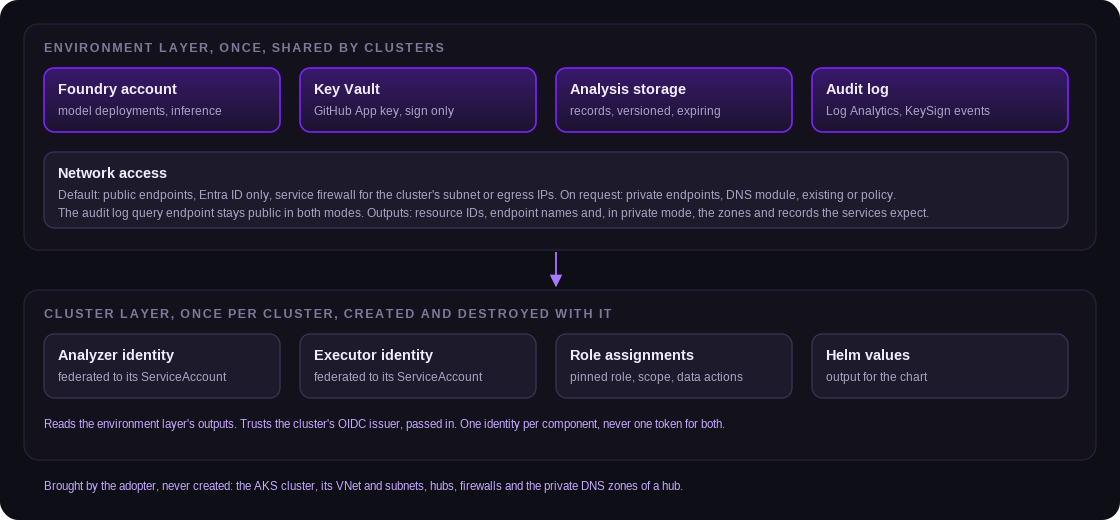
- Environment layer, once, shared by clusters: Foundry account and model deployments, Key Vault, analysis storage, audit log workspace, the service firewall rules, and in private mode the private endpoints and (optionally) private DNS zones. It outputs resource IDs, endpoint names and, in private mode, the zones and records the services expect.
- Cluster layer, once per cluster: the analyzer and executor managed identities, a federated credential for each that trusts the cluster's OIDC issuer and one ServiceAccount, the role assignments on the environment layer's resources, and the Helm values for the chart as an output. The whole layer is created and destroyed with its cluster. Recreating a cluster rebuilds the identities with new client IDs, so a deployment is updated from the module's Helm values output after each recreation.
The split is for adopters' environments: the records, the key and the audit trail belong to the environment, while everything that names a cluster is created and destroyed with it. The lab in shadewright-azure uses the module's layers with lifetimes of its own choosing (ADR-0008 stays as it is); where the lab needs the executor's sign assignment, the key must be imported first (github_app_key_imported in shadewright-azure, rotation steps in identity-rotation.md). A second cluster adds a cluster layer and nothing else. Identities are per cluster, so a cluster's pods never hold the token of another cluster's identity and one cluster's grants can be removed alone. Still one identity per component, never one token for both.
4. Restricted by default, private on request
Decided on 2026-11-08 (#546): full privacy is the adopter's choice, not the default.
Default: restricted public endpoints. The services keep public endpoints, and each one is locked down with its own features:
- Entra ID only: Shared Key and local authentication are off, so no account key or API key can be used.
- A service firewall that allows only the cluster's subnet (virtual network service endpoints, no extra cost) or its egress IPs, plus trusted Azure services where a service needs them, and the admin network CIDRs of section 6.
- No public blob access on the storage account.
Two prerequisites sit with the adopter. Service endpoints must be enabled on the cluster's subnet: the module does not touch the network. And storage IP rules do not apply to requests from the same Azure region, so egress IPs work for storage only when the cluster is in another region than the storage account.
The audit workspace is the exception in both modes. A Log Analytics workspace has no IP rules, so its query endpoint stays public, in private mode too. Reads need Entra ID and RBAC. Azure Monitor Private Link is out of scope (it is in the backlog), because it changes Azure Monitor name resolution for every virtual network linked to it.
On request: private endpoints. One module variable turns the public endpoints of the Key Vault, Foundry account and storage account off and puts a private endpoint for each of them in a subnet passed in by ID; the network around the subnet is the adopter's. Private DNS then works in one of three modes:
module. The module creates the private DNS zones (every Foundry zone it needs, vault and blob), links them to the virtual networks it is given, and registers the endpoint records.existing. The adopter passes the IDs of zones that already exist, for example in a hub subscription or a Virtual WAN. The module registers the records in them and creates no zone. The deployer needs the right to write records there.policy. The module creates no record. Azure Policy in the landing zone adds them, and the module ignores the DNS zone groups it does not own, so a later plan shows no diff.
In every private mode, apart from the audit workspace above, the module outputs the zones and record names it expects, for the in-cluster check of section 8.
Private endpoints are not the default because each one is billed per month and needs DNS work that most small installs do not need. An enterprise that needs them switches one setting.
5. Deployer permissions per layer, and the landing-zone option
The module states what the identity that runs Terraform needs, per layer, so a platform team can grant exactly that.
| Layer | Deployer needs | Why |
|---|---|---|
| Environment | Create resources in the resource group; set the service firewalls; in private mode, join the subnet for private endpoints and write DNS records in the zones (DNS modes module and existing); write role assignments (including the admin principal's Key Vault Crypto Officer, section 6) and, by default, role definitions |
The services, the endpoints, the DNS records and the roles that scope the grants |
| Cluster | Create managed identities and federated credentials in the resource group; write role assignments on the environment layer's resources | One identity and one credential per component, and the grants of section 6 |
The role assignments are the sensitive part: writing them is a privileged right. The module needs it only for the assignments it lists, so the documentation shows how to restrict the deployer to them (a role assignment condition limited to the module's roles) instead of asking for Owner. That condition bounds the deployer only in landing-zone mode (below). In the default mode the deployer holds roleDefinitions/write, so the condition does not limit it: it could define a role with any actions and assign it.
Landing-zone option. Many platform teams define custom roles ahead of time and do not let a workload deployer create them. The module can take the role definitions as input, by ID, instead of creating them. With them passed in, the deployer needs to write role assignments but not role definitions. The module publishes the exact definitions, for the platform team to create. Because a definition passed by ID is only a name to Terraform, the module reads each one with a data source and a precondition refuses the plan unless its actions, data actions, notActions and assignable scopes equal the published definitions. A platform team cannot widen a role by accident, and the pinned test of section 6 stays true in this mode. The default stays "the module creates them", because that is what the lab does today and what a single adopter wants.
6. Grants are pinned by a test (invariant 6)
A test of the module pins every role assignment it creates: role (or its definition's data actions), scope and principal. The analyzer gets inference on the Foundry account and blob write access on the one container; the executor gets sign on the one key. Anything else, a wider scope, an added action, a new assignment, fails the test. Changing the test is a change to invariant 6 and needs the maintainer's review, like a change to the operator's RBAC. The analyzer's blob grant is built as in the lab: blobs/write plus blobs/add/action (foundation/analysis-store.tf). That role can overwrite an existing blob, so it is not create-only. The recovery evidence is blob versioning, which the module requires and the pinned test pins; this is the state of ADR-0015 after its 2026-11-04 amendment. Making the role create-only is #154, which must close before the module's first release. The container is shared by all clusters of an environment, so until #154 one cluster's analyzer can overwrite another's records.
Admin grants. The module takes an operator input, an admin principal and admin network CIDRs. The principal gets Key Vault Crypto Officer on the vault, for importing and rotating the App key (foundation/keyvault.tf, identity-rotation.md), and the CIDRs are added to the service firewalls so the admin can reach the services. These assignments are pinned by the same test. The evaluation identity of the lab (foundation/evaluation.tf) stays lab-only in shadewright-azure.
This is the Azure side of the rule that the analyzer and the executor never share an identity and that no component gets more than it needs.
7. Naming and tags
The module ships naming defaults, close to what the lab uses (a resource type abbreviation, a workload name, a random suffix where Azure needs a globally unique name). Each pattern can be overridden, and each single resource name too, because adopters follow their own convention. Adopter tags are merged with ours; the adopter's win on a key clash, and we add only a small fixed set that says what the resource is for.
8. Accepted risk: private mode is not exercised in the lab
The lab runs the default, restricted setting; it does not run private endpoints or any of the three DNS modes, because the network that would make them real (hub, firewall, private zones) is the part the module does not create and the lab does not pay for. So the private path can be wrong in ways the lab never shows. We accept that, and reduce it: the module outputs the zones and records it expects, the module's tests cover the plan of each mode, and the documentation gives an in-cluster check (resolve each service's name from a pod and call the endpoint) that an adopter runs after install. The risk stays on the register until an adopter or a priced lab run has exercised private mode.
9. Known limitation: an existing model gateway
Some organizations put every model call behind an API Management gateway they own. The module does not support using it in place of its own Foundry account. It is in the backlog of the epic. Until then such an adopter runs the module's account, or does not use the module for the model.
Consequences
- One reference for what Shadewright creates on Azure and what each identity may do, testable, and the lab and adopters run the same code.
- More resources than a bring-your-own design: an adopter who wants to reuse a Key Vault or a Foundry account cannot. That cost is the price of scoped grants.
- A deployer with rights to write role assignments is needed in every setup. The landing-zone option removes the need to create definitions, not to assign them.
- The analyzer's blob role can overwrite records until #154 closes (section 6), and the audit workspace's query endpoint is public in both modes (section 4).
- Recreating a cluster rebuilds its identities with new client IDs; deployments take the new values from the Helm values output (section 3).
- Two layers mean two applies, with outputs passed from one to the other, in a fixed order, and a destroy that goes the other way.
- The private path ships with less proof than the restricted default (section 8).
- The default keeps public endpoints: what protects the services is Entra ID only access and the service firewalls, not the network path. An adopter whose policy forbids public endpoints must turn on private mode.
- A new repository to maintain: CI, ruleset, releases, Registry publishing.
- Invariant 6 now has an Azure half whose grants live in the module's pinned test. AGENTS.md invariant 6 names the analyzer's blob write in its list.
Alternatives considered
- Bring your own services (an existing Key Vault, Foundry account, storage). Fewer resources and a natural fit for shared platforms. Not chosen: grants on shared resources cannot be scoped to Shadewright's own data (invariant 6, need to know), the module could not pin what they allow, and a shared Key Vault would hold the App key next to unrelated keys.
- One instance of everything per cluster. One layer, simpler. Not chosen: it multiplies Foundry accounts (with their model quota) and Key Vaults, and it ties the records and the audit trail to a cluster that may be recreated (
lab/is disposable on purpose). The grants are already per identity, so the gain in isolation is small, with one exception we give up: all clusters' executors sign with the one GitHub App key, so a compromised executor holds the App's write power for every cluster. Per-cluster Apps or keys are the option for adopters who need that. - A full stack that also creates AKS and the network. A one-command demo. Not chosen: AKS, networks, hubs and firewalls are the adopter's to decide, and a module that creates them cannot be used on an existing cluster. The lab keeps its own AKS code in
shadewright-azure. - A module inside
shadewright-azure. No new repository. Not chosen: the Terraform Registry needs a repository namedterraform-<provider>-<name>with its own tags and releases, the lab holds lab-only code and values, and a module consumed from a lab repository is not a published, versioned interface. - Private endpoints by default. No public endpoint at all. Not chosen: every install would pay for one endpoint per service each month and need private DNS before the first apply, which most small installs neither need nor have. With Entra ID only access, service firewalls limited to the cluster's subnet or egress IPs and no shared keys, a public endpoint of the Key Vault, Foundry account or storage account accepts nothing from anyone else. The audit workspace's query endpoint stays public even then, behind Entra ID and RBAC (section 4). Installs that need no public path at all turn on private mode.
Amendments
None.